
Users that subscribed to ChatGPT in the Apple App Store can use the Restore purchases feature in the ChatGPT iOS app to restore their subscription on their iOS device.
To restore an Apple App Store subscription, sign in to the ChatGPT account you used when you subscribed. The purchase is linked to both that account and your Apple ID.
Under Settings -> Account -> Restore purchases
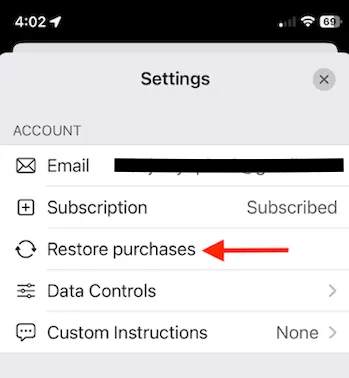
Note: The Settings screen may look different from this image. In the current iOS app, Restore purchases is still available in the Account section.
Note: Users who subscribed to on the web will need to manage their subscription at chatgpt.com.
Already tried restoring?
If your subscription is associated with another account, see our account-linking guidance. Mobile subscriptions cannot be transferred between ChatGPT accounts. If you cannot access the original account, or have already restored your purchase and still see Free, contact Support. Include the account emails/sign-in methods you tried, any error message, and the steps already completed.