
Purpose
This guide is intended to provide Admins and IT Teams with the necessary information to consider prior to configuring SSO in your ChatGPT or Platform accounts. SSO is available for Business, Enterprise, and Edu customers.
Background architecture and terminology
SSO is currently supported through SAML authentication for both ChatGPT and the API Platform.
Workspace refers to an instance of ChatGPT
Organization refers to an API Platform instance
Identity Provider (IdP) refers to the service you use to manage digital identity. We support connections through all IdPs that support SAML. Some of the most common IdPs we've connected with include:
Okta
Azure Active Directory/Entra ID
Google Workspace
Duo
For the full list of supported IdP's, please reference WorkOS's Integrations Page. We support all of the third-party integrations on this page that can be connected to via either SAML or OIDC.
Currently, every ChatGPT workspace has a corresponding Platform organization tied to it. This means that the Organization ID (org-id) you find in your Enterprise Platform "General" page is the same Organization ID (org-id) tied to your Enterprise ChatGPT workspace. As a result, your workspace and organization share the same authentication layer:
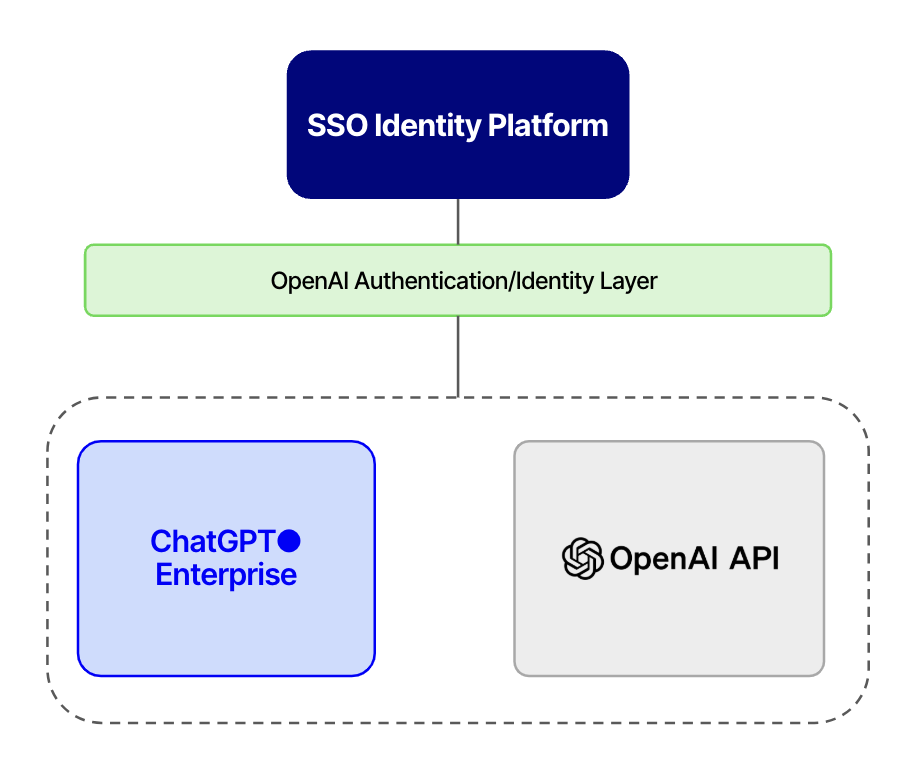
There are a few key things to note as a result of this architecture:
A single Organization ID (org-id) can only support a single IdP configuration.
Domain verifications and SAML SSO settings are shared between ChatGPT and the API Platform.
SSO has to be enabled separately on ChatGPT vs. the API Platform. However, once you've configured it on one, the other's "setup" is largely just flipping the switch and adding a bookmark app in your IdP if so desired.
Getting started with SSO
Before configuring SSO in your account, it's important to first understand some key concepts about OpenAI's SSO functionality.
General identity terminology
Provisioning When OpenAI refers to provisioning in the context of users, we are specifically referring to provisioning invitations. We do not directly support provisioning the creation of user accounts. Invitations can be provisioned through:
SCIM (supported in both the ChatGPT SCIM Integration and the API Platform SCIM Integration)
The "Members" page of ChatGPT or the API Platform
Automatic Account Creation
Invites API
Provisioning invitations is an independent step from the authentication performed by SSO.
Authentication – “Are you who you say you are?”
Example: an IdP authenticates a user to our service so we know they are who they say they are when logging in.
Authorization – “What are you allowed to do or see?”
Example: After your IdP authenticates you, we determine which ChatGPT workspace(s) you are a member of.
Getting to know OpenAI SSO Settings
Domain Verification This is a prerequisite for enabling SSO and Automatic Account Creation. Basically, “Do you own this domain?”
When logging in via chatgpt.com or platform.openai.com, a verified domain determines whether to forward a user to our password page or their IdP when SSO is also set up
Once a domain is verified in your Workspace, any user invited into the workspace with an email from that domain will be prompted to merge their personal account the next time they login.
ChatGPT authentication is domain AND workspace based - when a domain is verified and SSO is enabled on the workspace, only users in that workspace that share the domain will be routed to SSO. Users who share the domain but are NOT part of the Workspace (i.e. Free, Plus, Pro, or Team account users from your domain) will continue to log in through email/password or Social.
Platform authentication is domain-based -- when a domain is verified, and SSO is enabled, all Platform users underneath that domain will lose the ability to login with password. See "Domain Verification on ChatGPT vs. the API Platform" below for more details.
Subdomains must be verified separately from top-level domains
In order for us to successfully process your domain verification, your TXT record must be readable through a DNS lookup.
(ChatGPT only) Automatic Account Creation (AAC) When enabled on a ChatGPT workspace, a new user whose email matches the verified domain(s) will automatically receive an invitation to the Enterprise workspace when they sign up. We do not recommend enabling AAC if you are using SCIM.
(ChatGPT only) Allow External Domain Invites This setting controls whether or not users with non-verified domains can be invited to the workspace. Users from external domains will not be required to log in through SSO as SSO settings only apply to users belonging to the verified domain.
Enable SSO This setting determines whether or not your configured SSO settings apply to the workspace and/or organization.
Enforce SSO
When disabled, this setting allows users with a verified domain to choose from logging in via SSO or through social login.
Global Admins can set Enforce SSO to Required for both ChatGPT and the API Platform directly from the Manage SSO page in the Admin Console. When enabled, this setting makes it so that users with a verified domain can only sign into the SSO-enabled workspace or organization through SSO. Password and social authentication are no longer valid for the workspace/organization, but can still be used in other workspaces/organizations where their domain is not verified.
Domain Verification on ChatGPT vs. the API Platform
As discussed earlier, domain verification is applied across the shared ChatGPT and Platform instances. However, there is a critical difference in how domain verification impacts logins to ChatGPT vs. the Platform if SSO is enabled:
SSO on the API Platform is entirely domain-based. This means that once a domain has been verified on any organization, and SSO enabled, ALL users with that domain will lose the ability to login with passwords. If they do not have a means of Social authentication, then they will be locked out of their respective organizations unless they belong to the IdP access group.
Conversely, on the ChatGPT side, only users who belong to the workspace where the domain has been verified will be impacted. Users who are not in the IdP's access group will still be able to log into workspaces using the methods discussed in the next section.
Login experience for your users
OpenAI supports three different authentication methods:
Username + Password
Social Authentication via Microsoft/Google/Apple
SSO
Keep in mind that the behavior will vary depending upon whether the user is logging into ChatGPT or the API Platform, whether their domain is verified, and whether their respective workspaces/organizations have enforced SSO.
SP-Initiated Login
All users can navigate directly to either chatgpt.com or platform.openai.com in order to login. When using this option, the different authentication methods can be triggered as shown below:
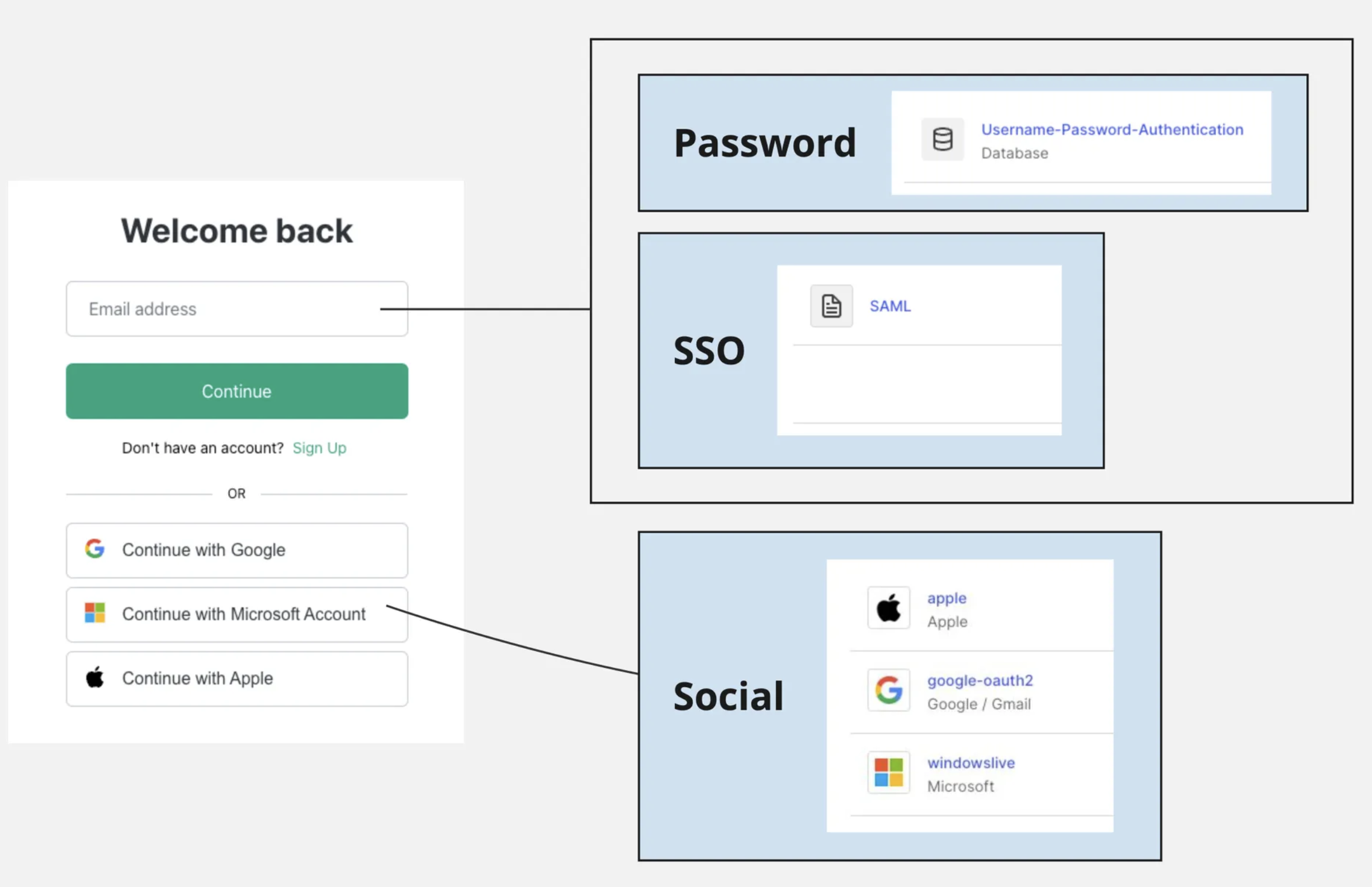
If the user belongs to multiple workspaces, including one where SSO has been enabled for their domain, they will be prompted to select which workspace to login to.
ChatGPT SP-Initiated Login
If we find that the entered email belongs to a workspace where its domain is verified, we will forward the user to their IdP to authenticate. Otherwise, the user will be directed to login by entering their password.
If the user belongs to multiple workspaces, including at least one where SSO has been enabled for their domain, they will be prompted to select which method to use to login:
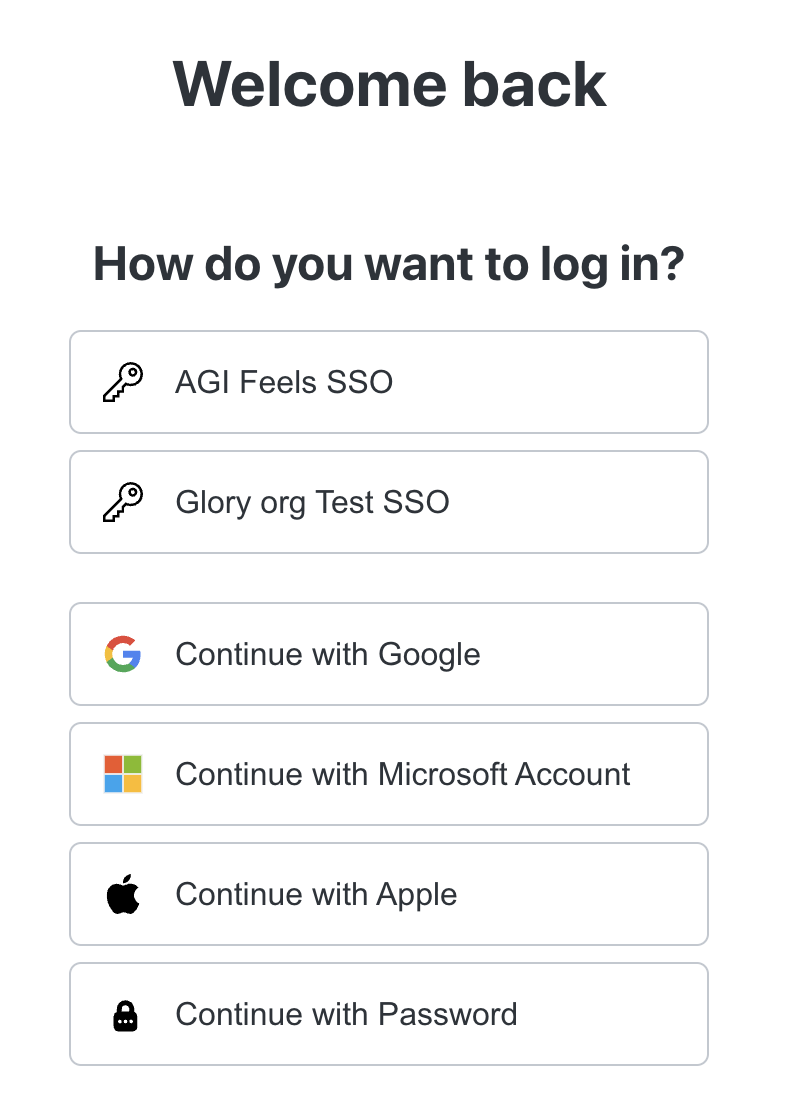
Note: if "Enforce SSO" has been enabled for a particular workspace, users with the verified domain(s) can only login through SSO. Social and Password authentication will not be available.
Platform SP-Initiated Login
As mentioned previously, when a user with a verified domain enters their email on the Platform login page, they will always be directed to their IdP to authenticate.
This is why it's critical to ensure your understanding prior to enabling SSO for Platform. Otherwise, it's very easy to mistakenly lock out Platform users on personal accounts.
IdP-Initiated Login
When configuring SSO from their respective identity pages, you will find a unique Tile URL provided for both ChatGPT and the API Platform:
ChatGPT: https://chatgpt.com/auth/login?sso=true&connection=conn_012abcdef
Platform: https://platform.openai.com/enterprise/conn_012abc/login
These Tile URLs can be configured within your IdP to allow your users to automatically login/authenticate with a single click.
Next Steps
Now that you have a good basis of our architecture, please proceed to our "Understanding Your Ideal User Management Setup" page to determine the ideal implementation for your use-case. Following this, we will walk you through how to configure SSO and SCIM within your account.